
搜索




登录

分享

复制
2026-03-05 15:53:23
Daraz优惠券怎么设置?
卖家中心左侧导航栏Seller Tools > 下拉 点击Seller Voucher 进入优惠券页面,
点击 Add New Voucher ,打开创建优惠券设置页面。
注意:Collectible Voucher & Voucher Code两类优惠券都是在同一页面进行设置
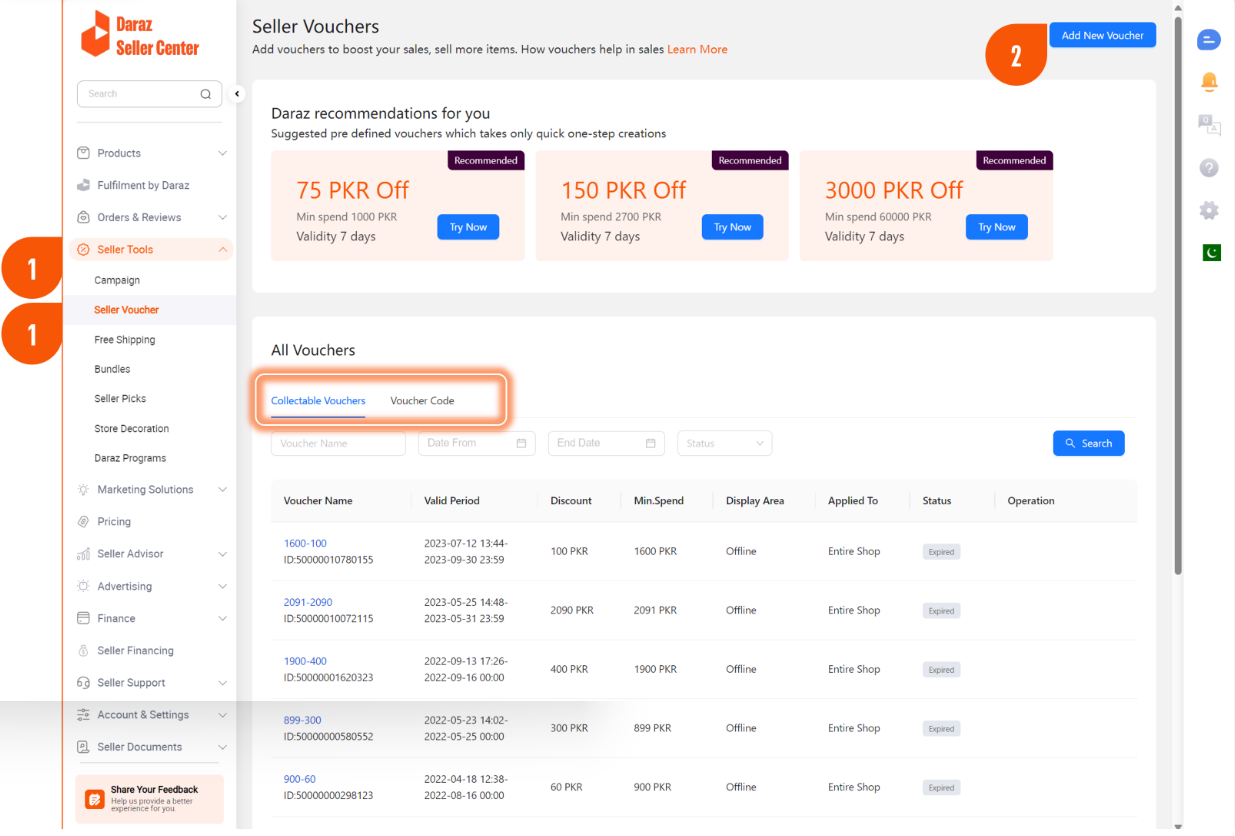
优惠券页面设置
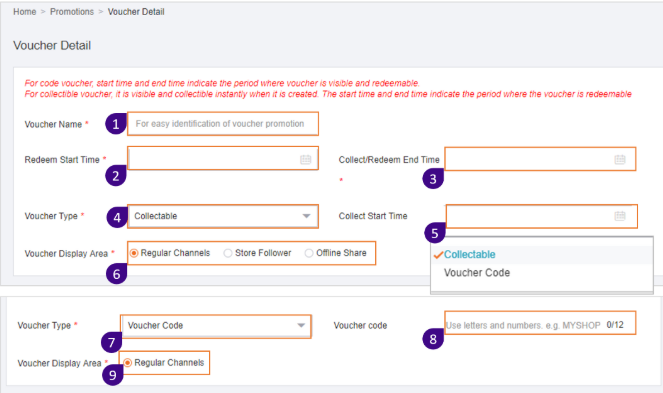
1. 优惠券的名称,简单容易识别;
2. 优惠券可使用日期(必须晚于创建时间);
3. 优惠券到期日(必须晚于创建时间) ;
4. 优惠券的类型:Collectable & Code
5. 选择Collectable优惠券时:优惠券收集开始日
6. 选择Collectable优惠券时:展现类别
Regular Channels:面向所有消费者
Store Follower: 面向店铺粉丝
Offline Share: 用于线下分享
7. 选择 Voucher Code的类型将不同于Collectable
8. 需要输入优惠代码给消费者使用
9. 展示渠道只能选择 Regular Channels
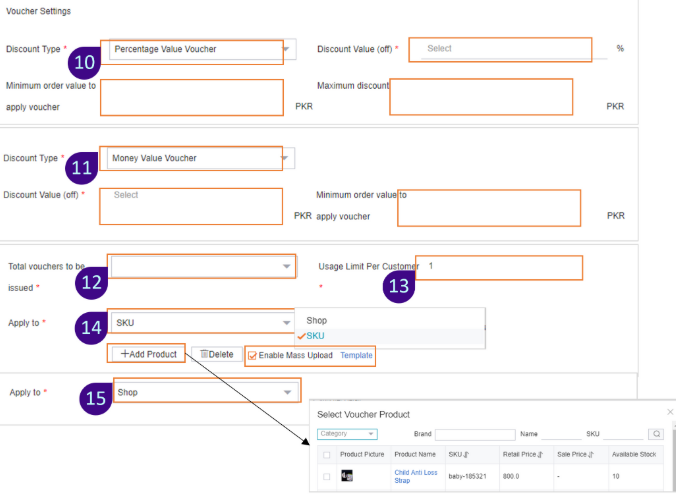
优惠券可提供折扣金额或折扣率的方式供消费者领取,也可以设置是面向全店使用或是特定的SKUs可使用。
10. Percentage Value Voucher :选择提供折扣率时
- Discount Value:设置可折扣率
- Minimum order value to apply voucher: 最低消费金额要求
- Maximum discount:最高可折扣金额
11. Money Value Voucher:选择提供金额折扣
- Discount Value:设置可折扣金额
- Minimum order value:最低消费金额要求
12. Total vouchers to be issued:优惠券张数13. Usage limit per customer:每个消费者最多可使用张数14. Apply to SKU:面向特定SKU做折扣
- Add Products:添加产品
- Enable Mass Upload:可下载模板,批量添加产品
15. Apply to Shop:面向全店做折扣
【版权提示】信息来自于互联网,不代表出海网官方立场,内容仅供网友参考学习。如发现本站内容存在版权问题,烦请提供版权疑问、身份证明、版权证明、联系方式等发邮件至 jechynwu@chwang.com ,我们将及时沟通与处理。如若转载请联系原出处



企业跨境出海综合服务平台



新手指南
热门推荐
平台常见问题
版权归出海网跨境电商(广州)有限公司所有 粤ICP备2021037671号-5